
Guitar Pro costs $69.95, and its free trial lasts seven days. You don’t need it to write tabs. TuxGuitar opens Guitar Pro files from version 1 to 7 and costs nothing, and it’s only the first of eleven free options on this list.
They don’t all do the same job, though. Some are full tab editors, some mainly open and play Guitar Pro files, and a couple turn a recording into tab for you. Free versions always have a catch, so each entry says exactly what the free version leaves out. Everything was checked on 12 October 2026.
If you only want to find tabs for a song rather than write your own, my list of websites for guitar tabs is a better place to start.
Quick Comparison
| Program | Works on | Price | Opens Guitar Pro files | Saves Guitar Pro files |
|---|---|---|---|---|
| TuxGuitar | Windows, Mac, Linux, Android | Free | Yes | Yes (.gp3 to .gp5) |
| MuseScore Studio | Windows, Mac, Linux | Free | Yes | No |
| Power Tab Editor 2 | Windows, Mac, Linux | Free | Yes | Yes (.gp) |
| Soundslice | Browser | Free, Plus $5 a month | Yes | No |
| Flat | Browser, Windows, Mac, phones | Free up to 15 scores | Yes | No |
| Songsterr | Browser, phones | Free, Plus $9.99 a month | Not stated | Plus only |
| TEFview | Windows, Mac, phones | Free viewer | Yes | No |
| Klangio Guitar2Tabs | Browser, phone app | 20 second free demo | Makes tab from audio | Paid plans |
| TabMaker | Browser, phones | Free with ads | Not stated | No |
| Dorico SE | Windows, Mac | Free | No | No |
| Sibelius First | Windows, Mac, mobile | Free up to 4 staves | No | No |
TuxGuitar

- Works on: Windows, Mac, Linux, Android
- Made by: an open source community (GitHub: helge17/tuxguitar)
- Price: free, no paid version
- Guitar Pro files: opens .gtp, .gp3, .gp4, .gp5, .gpx and .gp; saves .gp3 to .gp5
TuxGuitar is the closest thing to a free Guitar Pro. It’s a multitrack tab editor and player that opens Guitar Pro files from version 1 to 7, plus Power Tab and TablEdit files, and it can save back to the older Guitar Pro formats. It also exports PDF, MIDI, MusicXML, audio and plain text tab.
The practice tools are better than you’d expect from free software. You can slow a song down, loop a range of bars, and switch on Training mode, which raises the tempo a little on every pass. Bends, slides, hammer ons and pull offs, palm muting, harmonics, tapping and custom tunings are all there, and drums go on their own track.
Two catches. The sound comes from a basic MIDI soundfont, so playback sounds like a keyboard doing a guitar impression, although you can load a better soundfont. And the installers aren’t signed, so Windows and macOS will warn you before installing. That’s expected; just download it from tuxguitar.app or its GitHub page. The old TuxGuitar websites went offline at the end of 2022, and tuxguitar.org, which ranks on Bing, says in its own footer that it isn’t affiliated with TuxGuitar. The latest version is 2.1.0, from July 2026, which is newer than the one in the video.
MuseScore Studio

- Works on: Windows, Mac, Linux
- Made by: MuseScore (Muse Group)
- Price: free and open source
- Guitar Pro files: opens .gtp to .gp and Power Tab; can’t save to Guitar Pro
MuseScore is a full notation program with proper tab staves, and its big advantage is sound. Install the free Muse Guitars Vol. 1 library through Muse Hub and playback uses real guitar samples instead of MIDI, which makes a huge difference when you’re checking whether a riff sounds right.
Palm mutes, let ring, slides and bends all play back, and you can adjust how far and how fast a bend goes. There’s a loop button and a speed control for practice. It exports PDF, audio, MIDI and MusicXML.
The catch is that it only goes one way with Guitar Pro. It opens Guitar Pro files, but it can’t save them back, so if you share files with Guitar Pro users, they’ll need MusicXML or PDF from you. The current version is 4.7.5, from September 2026.
Power Tab Editor 2
- Works on: Windows, Mac, Linux
- Made by: an open source community (GitHub: powertab/powertabeditor)
- Price: free and open source
- Guitar Pro files: opens .gp3, .gp4, .gp5, .gpx and .gp; exports .gp
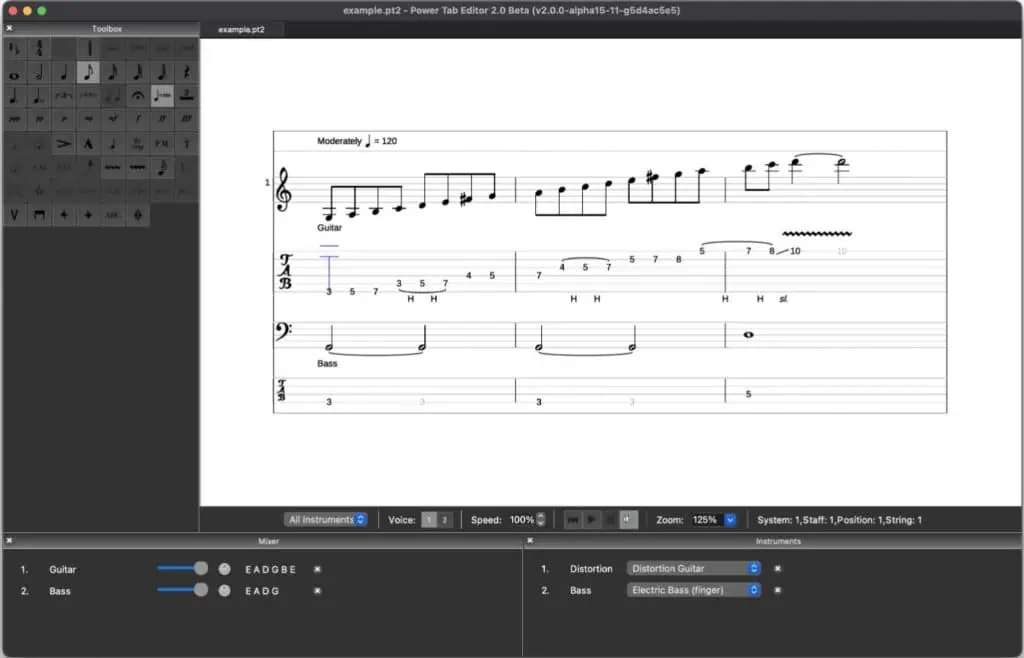
If you used Power Tab back in the 2000s, this is its modern replacement. The original editor stopped being developed and its source code went missing, so a group of developers rewrote it from scratch. It opens old Power Tab files and Guitar Pro files, and it can export to the current Guitar Pro format.
It’s a simpler tab editor than TuxGuitar, focused on writing tab rather than full scores. Playback has a speed control, a metronome and a count in, and there’s a list of preset tunings including half step down, whole step down, and 7 and 8 string tunings.
Be careful where you download it. Many old tutorials still point to the old Power Tab website and to download mirrors for version 1.7, which is long outdated. The current version, 2.0.22, lives on the project’s own site and GitHub page, which is also where the screenshot above comes from.
Soundslice

- Works on: any web browser, including tablets
- Made by: Soundslice
- Price: free plan; Plus is $5 a month or $50 a year
- Guitar Pro files: imports .gp3 to .gp; export needs Plus
Soundslice runs in your browser and has the most generous free plan here. You get unlimited pieces, the tab editor, Guitar Pro import, looping, slowing down without changing the pitch, and no ads.
Its party trick is syncing a tab to a YouTube video, so the notes scroll along with the real recording. For learning a solo from a live video, that’s brilliant. You type fret numbers straight into the tab, and it handles bends, slides, harmonics and tapping.
The free plan holds back two things that matter: you can’t print or export your own tabs (PDF, MusicXML and MIDI need Plus), and you’re limited to preset tunings. The presets cover drop D, half step down, open G, drop C and 7 and 8 string standard, which is enough for most rock.
Flat

- Works on: browser, Windows, Mac, iOS, Android
- Made by: Flat (Tutteo)
- Price: free up to 15 scores; Power is $9.99 a month or $49.99 a year
- Guitar Pro files: imports .gp3 to .gp, on a best effort basis
Flat keeps tab and standard notation in sync as you type, and works the same in a browser, a desktop app or on your phone. It handles bends, slides, hammer ons, pull offs, harmonics, palm mutes, custom tunings and capos, for anything from 3 to 14 strings.
The free Basic plan holds 15 scores, and anything you export or print carries a Flat logo. It exports PDF, MusicXML, MIDI and audio. Flat says it reads Guitar Pro files on a best effort basis, so complicated files may not come through perfectly.
One small gotcha: the phone app can’t change tuning or capo yet. Do that on the website or the desktop app first.
Songsterr

- Works on: browser, iOS, Android
- Made by: Songsterr
- Price: free to view and write; Plus is $9.99 a month
- Guitar Pro files: downloads (as Guitar Pro, MIDI or audio) need Plus
Most people know Songsterr as a tab site, but it has its own editor too. On the New Tab page you can create a blank tab and write it yourself, and your tab stays private until you choose to share it.
It also offers an AI draft: paste a YouTube link or upload a recording and it tries to tab it out for you, which is what the video above puts to the test. Full AI transcriptions are a Plus feature, with 50 a month.
The free version is thinner than it looks. Slowing down, looping, printing and downloading tabs all need Plus, and Plus only comes as a monthly payment. If you mainly want to practise with slow down and loop, Soundslice or TuxGuitar give you that for free.
TEFview

- Works on: Windows, Mac, iOS, Android
- Made by: TablEdit
- Price: TEFview is free; TablEdit costs $59.97 once
- Guitar Pro files: TEFview opens Guitar Pro files
TablEdit is a paid tab editor that’s been around for decades, and TEFview is its free viewer. TEFview opens Guitar Pro, Power Tab, MusicXML, MIDI and TablEdit files, plays them at any speed, loops sections and prints them. It’s a good pick if someone sends you a Guitar Pro file and you just want to play along with it on your phone.
It won’t let you write tabs. For that you need TablEdit itself, a one time $59.97 purchase; the free demo only saves 16 measures. The video shows TablEdit, and TEFview plays and prints the same files.
Klangio Guitar2Tabs

- Works on: browser and a phone app
- Made by: Klangio (Germany)
- Price: free demo of 20 seconds; full use needs a subscription
- Guitar Pro files: exports .gp on paid plans
Klangio does something the others don’t: you give it a recording, an audio file or a YouTube link, and its AI writes the tab. It covers electric, acoustic and bass, strummed or picked, and says it can pick the guitar out of a full band recording.
The free demo is only a taste. It transcribes the first 20 seconds, gives you a PDF only, and you can’t edit the result. The Pro subscription gives 50 full transcriptions a month, songs up to 15 minutes, Guitar Pro, MIDI and MusicXML downloads, and an edit mode to fix what the AI got wrong.
And it will get things wrong. Klangio’s own FAQ admits that if a human tabber would struggle with a track, the AI might too. Treat it as a first draft.
TabMaker
- Works on: browser, iOS, Android
- Made by: TabMaker
- Price: free with ads; Pro is $2.99 a month and removes them
- Guitar Pro files: not mentioned on its site
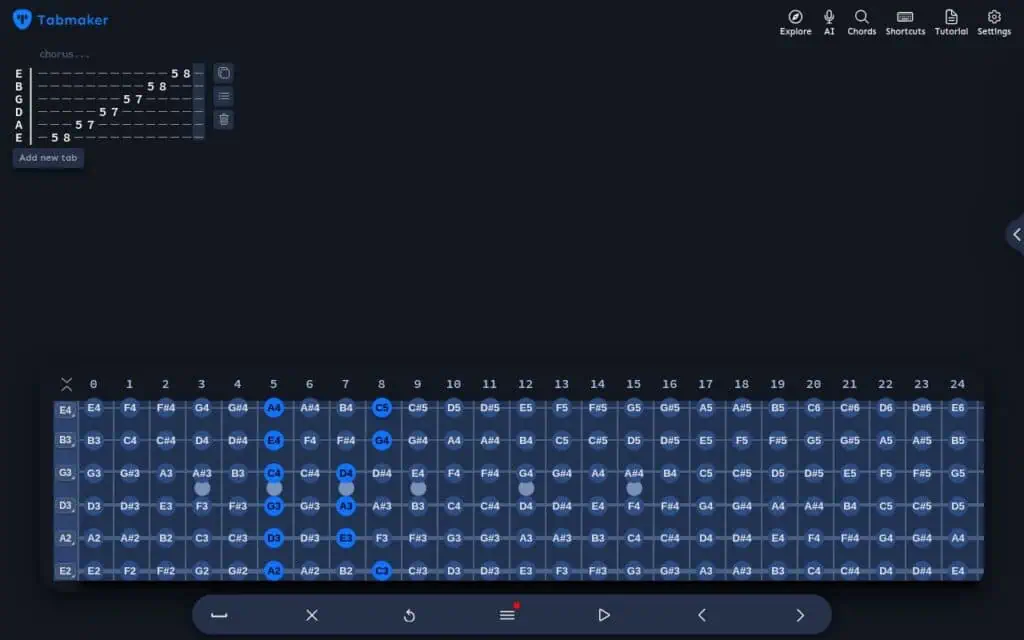
TabMaker is the quickest way to get a riff out of your head and onto paper. It opens in your browser, you click notes on the fretboard at the bottom, and the tab appears at the top; the picture above shows a minor pentatonic run entered that way. It plays your tab back with acoustic, electric, bass or banjo sounds, including custom tunings.
It prints, exports PDF or plain text tab, and gives you a link to share. The apps are free too, although saving a PDF in the apps is part of Pro. It can also turn a short recording into tab: record a riff or upload an MP3, and the free version gives you three tries of up to 15 seconds each.
Don’t expect Guitar Pro features, though. The Simple editor is a quick grid for riffs, and the Advanced editor adds rhythm, tempo and up to six tracks, but TabMaker doesn’t mention Guitar Pro files anywhere. It suits quick ideas and lessons better than full band arrangements.
Dorico SE

- Works on: Windows, Mac (and a free iPad app)
- Made by: Steinberg
- Price: free, for up to 8 players
- Guitar Pro files: no; imports MusicXML and MIDI
Dorico is a professional notation program, and SE is its free version, which Steinberg promises is free to use, forever. It handles up to eight players, with guitar tab, chord symbols, chord diagrams and drum parts.
Steinberg rates the tab support in SE as limited, with full tab support only in the paid Pro edition, and it doesn’t open Guitar Pro files at all. That makes it the right pick for a guitarist who also reads standard notation and writes for a band, and the wrong one if all you want is tab. The video shows the tab features that came in Dorico 3, some of which may be Pro only.
Sibelius First

- Works on: Windows, Mac, iPad, iPhone, Android, Chromebook
- Made by: Avid
- Price: free up to 4 staves (needs an Avid account)
- Guitar Pro files: no; opens MusicXML and MIDI
Sibelius First is the free version of Avid’s Sibelius, and it works on almost everything, including Chromebooks and Android tablets. Its best guitar feature is dynamic guitar staves: type a note in the tab or in the notation and the other one updates, and Avid includes this in the free version.
The limit is four staves. A guitar shown as notation plus tab uses two of them, so in that layout you fit about two guitar parts. Avid’s comparison page lists its tab support as basic, and puts audio and PDF export in the paid versions. Good for writing out a part with notation. Too tight for a full band arrangement.
Common Questions
Is Guitar Pro Free?
No. Guitar Pro 8 costs $69.95 once for new users, which covers up to five computers and free updates within version 8. The free trial gives you every feature for seven days. You have to enter an email address to download it, and that signs you up for their newsletter, although you can unsubscribe.
Is TuxGuitar Safe?
Yes, as long as you download it from tuxguitar.app or its GitHub page. The installers aren’t signed, so Windows and macOS show a warning. That’s normal for this project. Avoid lookalike sites: tuxguitar.org says in its own footer that it isn’t affiliated with TuxGuitar.
Can MuseScore Open Guitar Pro Files?
Yes. MuseScore Studio opens every Guitar Pro format from .gtp to .gp, plus Power Tab files. It can’t save back to Guitar Pro, so export MusicXML or PDF if you’re sharing with a Guitar Pro user.
How Do I Open A .gp File Without Guitar Pro?
TuxGuitar, MuseScore Studio and Power Tab Editor 2 all open it on a computer for free. In a browser, Soundslice and Flat import it. On a phone, TEFview opens Guitar Pro files for free.
Can AI Turn A Song Into Tab?
It can make a draft. Klangio Guitar2Tabs gives you 20 seconds free, Songsterr includes 50 full AI transcriptions a month in Plus, and TabMaker can listen to a riff through your microphone. None of them is perfect, so expect to correct the result by ear.
Which One Works On Linux?
TuxGuitar, MuseScore Studio and Power Tab Editor 2 all run on Linux, and the browser tools (Soundslice, Flat, TabMaker) work anywhere.
Conclusion
If I could only install one, it would be TuxGuitar. It’s the one that behaves most like Guitar Pro, it opens the files people share, and it’s free with no catch. Add MuseScore with Muse Guitars when you care how the playback sounds, and use Soundslice when you want the tab scrolling along with a YouTube video.
And if you’ve ever been told tabs are cheating, here’s my take on whether using guitar tabs is cheating. If you’re just starting and tab still looks like a phone number, my book, From First Chord to First Solo, takes you from your first two chords to your first solo without any music reading.
Good luck and keep on rockin’!
If you found this article useful, you may want to save this pin below to your Guitar board.
Recent Posts
D, A, Bm and G are the I, V, vi and IV chords of D major, the same pattern that C, G, Am and F make in the key of C. Wikipedia calls it the Axis progression, after the Australian comedy band The Axis...
D, G and A are the I, IV and V chords of D major. Wikipedia lists the notes of D major as D, E, F#, G, A, B and C#, so D is the 1st note, G the 4th and A the 5th. Its page on three chord songs says...